
Asset pipeline
weld asset make turns a description into an imported, previewed, provenance-tracked Unreal
asset. Generation runs on your own NVIDIA GPU (or a teammate’s, through jobs), cleanup runs
in headless Blender, and a human approves each of three gates along the way.
weld asset make "a brass oil lantern with a warm glow" --kind prop --tris 5000Or just ask Claude: “make a lantern prop in our style”. The make-asset skill writes a brief,
starts the pipeline and stops for you at every gate.
The stages
Section titled “The stages”prompt ─► concept ─► [gate 1: concept] ─► image-to-3D ─► [gate 2: mesh] ─► Blender cleanup, rig, LODs, export, previews ─► library + Git LFS ─► Unreal import ─► [gate 3: engine] ─► done| Stage | What runs | Where |
|---|---|---|
| Concept | A concept image from your prompt and the game’s style preset, with FLUX.1 [schnell]. Bring your own instead with --image. |
GPU node |
| Image-to-3D | BiRefNet cuts the object out of the approved concept, then TRELLIS.2 turns it into a textured mesh (GLB with PBR textures). | GPU node |
| Blender cleanup | Headless Blender: merge by distance, optional voxel remesh, decimate to the triangle budget, remove loose geometry, fix normals, UV unwrap when needed, scale to real-world height, pivot at the base. | Any node with Blender |
| Rig | Humanoid characters get a Rigify rig; props are never rigged by accident. | Blender |
| LODs and export | LOD chain by decimation, FBX + GLB for Unreal (SM_ / SK_ naming, correct units and axes). |
Blender |
| Previews | A normalized GLB, thumbnail and turntable for the asset library. | Blender |
| Register | The files, previews and provenance are stored on the hub; the engine-ready files are copied into the game for a Git LFS commit. | Hub + your checkout |
| Import | Unreal Interchange import through the editor’s MCP server, plus an in-engine screenshot. | Your editor |
Default triangle budgets come from the asset kind and the game’s style (for example a stylized
prop: 5,000; a stylized character: 20,000). Override with --tris and --height.
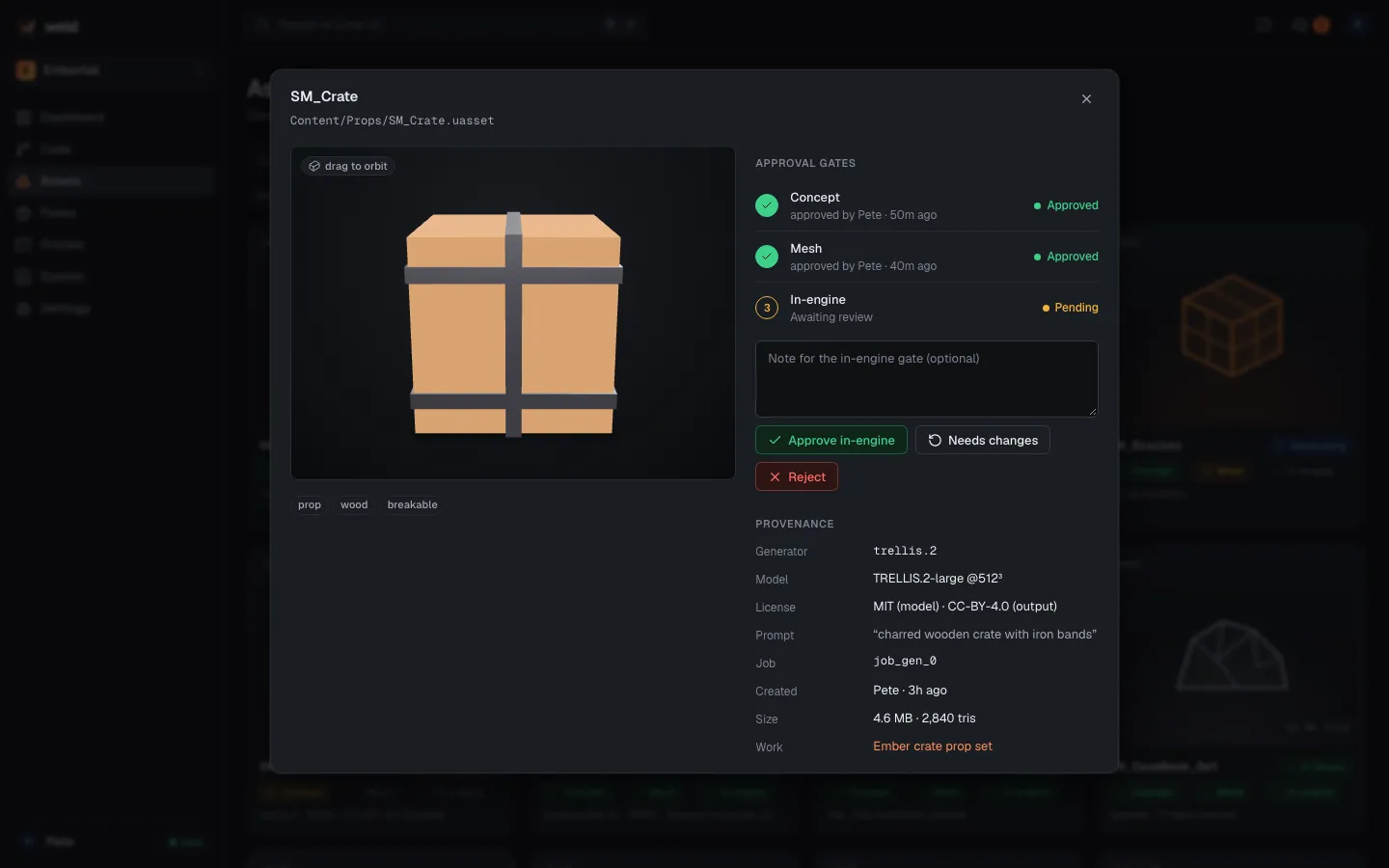
The three gates
Section titled “The three gates”The pipeline never skips a gate, and agents never approve one.
| Gate | You see | Check |
|---|---|---|
| 1 · Concept | The concept image(s) | Matches the brief and style; readable silhouette; nothing off-brief |
| 2 · Mesh | Turntable renders, wireframe, triangle count, texture sheet | Shape matches the concept; no holes or floaters; within budget; clean UVs |
| 3 · Engine | In-engine screenshot in a lit test map, LODs, collision | Scale next to the player, materials, pivot, collision |
At each gate: approve, reject with a note (the note updates the brief, so make it
specific and visual) or regenerate (same brief, new seed). After three attempts at one gate
you’re asked whether to change the brief or stop (--max-attempts).
Decide wherever you are: in the terminal that started the run, in the web asset library, or with
weld asset gate <id> concept|mesh|engine --approve|--reject|--regenerate. The run continues on
the first decision.
Running on a remote GPU
Section titled “Running on a remote GPU”Image generation needs CUDA. On a Mac (or any machine without a suitable NVIDIA GPU), weld asset make sends the concept and image-to-3D steps to a GPU node as typed, signed asset.concept and
asset.gen3d jobs. The node needs CUDA and 12 GB or more of VRAM.
weld asset make "a mossy rock" # auto: here if this machine has CUDA, else a GPU nodeweld asset make "a mossy rock" --gpu remote --gpu-role gpu-genweld asset make "a mossy rock" --on nod_5b0e # a specific node, e.g. the RTX PCThe concept image is uploaded as a job artifact; the mesh and its provenance come back as
sha256-verified artifacts, and Blender continues locally. The job id is saved next to the output,
so weld asset make --resume <dir> waits for the same job instead of starting another.
On the GPU node, Weld picks settings for the card: on 16 GB cards TRELLIS.2 uses its 1024 cascade with low-VRAM mode (about 76 s to generate and 56 s to export on an RTX 4080 SUPER), smaller cards use 512. If Windows silently pages GPU memory to system RAM, Weld notices, warns, and steps down on the next run. GPU jobs wait while Unreal is compiling or building on that machine.
Set up a GPU node with weld setup --roles gpu-gen, see
Windows PC as a build and GPU node.
Licenses and provenance
Section titled “Licenses and provenance”Every generated step records the model, version, license, seed, node and job. A project’s
allowed model licenses live in .weld/project.toml:
[assets]model_licenses = ["MIT", "Apache-2.0", "BSD", "DINOv3 License"] # the defaultAssets made with a model outside the list are flagged, and the merge queue checks the same rule.
TRELLIS.2 and BiRefNet are MIT-licensed; FLUX.1 [schnell] is Apache-2.0. Two of the models are
gated on Hugging Face (FLUX.1 [schnell] and DINOv3, which TRELLIS.2 uses): accept their licenses
there once and weld setup --roles gpu-gen downloads them. Until then you get
WELD-E4213.
Resuming and troubleshooting
Section titled “Resuming and troubleshooting”- State is saved after every step in the run’s work directory (by default
<game>/.weld/out/assets/<name>-<time>).weld asset status <dir>shows where it is;weld asset make --resume <dir>continues a failed or interrupted run. - GPU out of memory: retry; Weld steps down to lower settings.
- A Blender step failed: read the job log (
weld jobs logs <id>) and retry once. - No GPU node available: the error names what’s needed. Check
weld node capson the GPU PC. --fakeruns the whole pipeline with placeholder generation, without a GPU, to test the wiring.
Step-by-step: Making an asset.