
Hub and nodes
A Weld setup has exactly one hub per team and one node per machine.
The hub
Section titled “The hub”The hub (weld-hub) is the single authority for everything the team shares:
- Projects, members and invites. People sign in with a passkey or an emailed code; each machine gets its own device token.
- Work items, overlaps, predicted conflicts, the activity feed and the inbox.
- Git and Git LFS hosting for the game. The hub serves standard git over HTTPS, so
git clone,git pushand your editor’s git integration work as usual, and large files go through Git LFS with no file locking.weldregisters itself as git’s credential helper for the hub, so you never paste a token. - The merge queue, the only way changes land on
mainafter the first push. - Jobs: routing builds, smoke tests and GPU work to the right node.
- Packs, assets, project secrets and telemetry (logs, traces, costs).
- The web dashboard: activity, Work, overlaps and conflicts, merges, critic scores, code, the asset library, packs, friction reports, system health and settings.
A team runs its own hub on a spare machine or a small server, as a service that starts at boot and restarts itself if it stops. Hubs set up on a server keep continuous backups of the database and the game repositories, so a lost server can be rebuilt.
A node is the weld program on a person’s machine. You join a machine to a hub once with
weld node (see Getting started); after that the node daemon runs in the
background (weld node install-service keeps it running at login).
The node:
- serves the MCP server and hooks that Claude Code talks to, on
127.0.0.1:7421; - keeps a local cache of Work and events pushed from the hub, so hooks answer in about a millisecond;
- pushes your work in progress to the hub about once a minute (see WIP refs and conflicts);
- runs jobs for the team: builds, smoke tests, Blender steps, 3D generation;
- collects telemetry from Claude Code, Blender and Unreal and forwards it to the hub;
- supervises third-party tools (Blender, Unreal, git, Claude), capturing logs and crashes.
Each node keeps one outbound HTTPS + WebSocket connection to the hub. Nothing needs to connect in to your machine.
Capabilities and roles
Section titled “Capabilities and roles”Nodes advertise what they can do so the hub can route jobs: OS, GPU and VRAM, installed tools
(Unreal, Blender), load and idle state. weld node caps prints them.
Roles say what a machine is for:
| Role | Used for | Prerequisites Weld sets up |
|---|---|---|
asset |
Blender cleanup and asset processing | Blender, uv |
build |
Unreal builds, packaging, smoke tests | Unreal Engine 5.8 |
gpu / gpu-gen |
Concept images and image-to-3D | NVIDIA driver (pointed to, never installed), uv, CUDA 12.4 toolkit, VS Build Tools, the TRELLIS.2 and FLUX.1 models |
Git, Git LFS and Claude Code are set up on every machine. Pick roles when joining
(--roles build,gpu), later with weld setup --roles …, and manage the routing roles with
weld node role add|rm|list.
Several machines, one person
Section titled “Several machines, one person”Join each of your machines with the same account: weld node on the new machine asks you to
sign in and approve it in the browser with your existing passkey. A typical setup is a Mac you
work on plus a Windows PC that builds and generates assets. See
Windows PC as a build and GPU node.
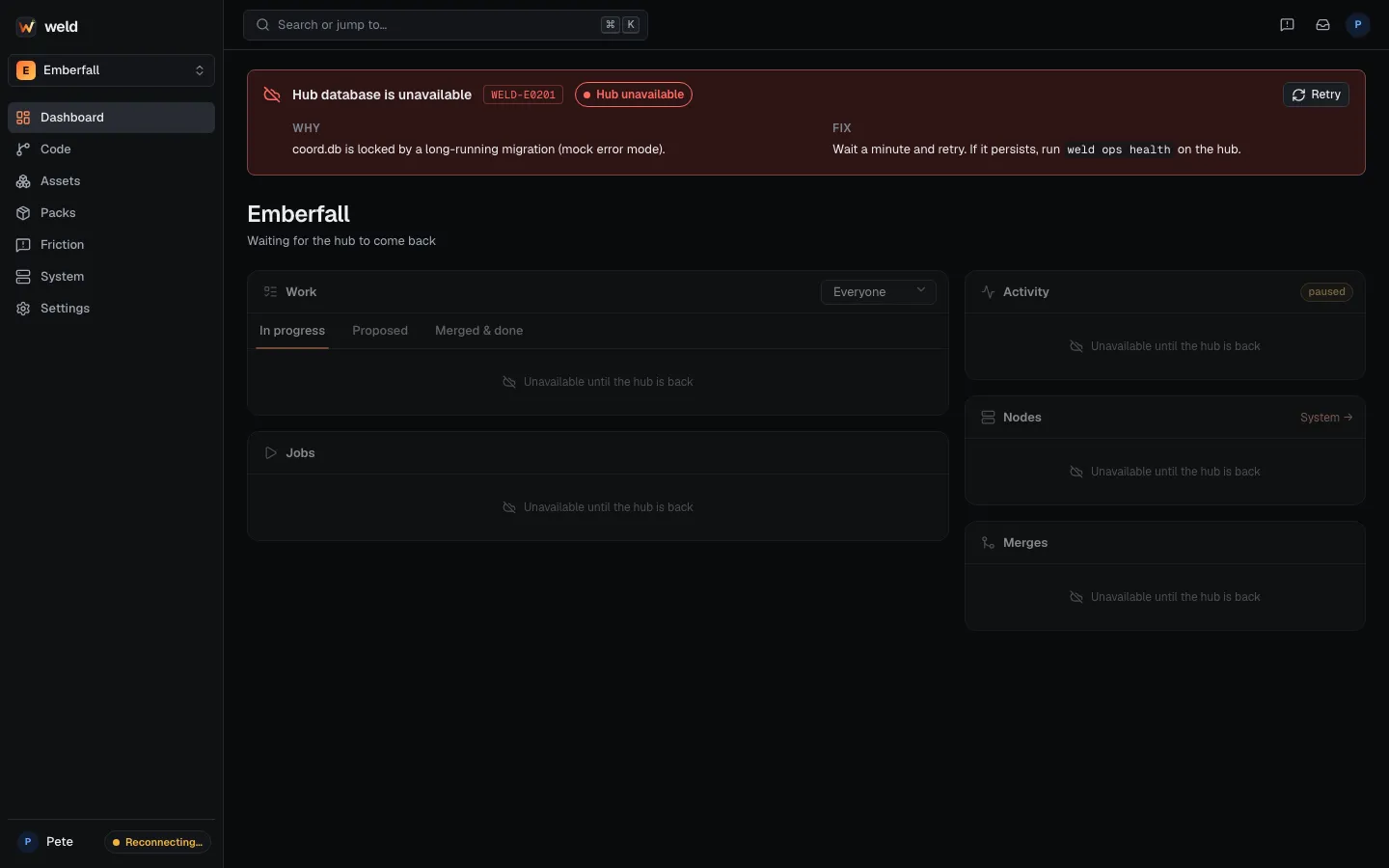
When the hub is down
Section titled “When the hub is down”Work continues. git, Unreal and Claude Code don’t need the hub, and Weld hooks fail open.
The node queues Work updates and reconciles them when the hub comes back. What pauses:
overlaps and the inbox, the merge queue, remote jobs and pushes to the hub’s git. Commit
locally and push later. weld status shows hub offline and the dashboard shows a banner:
Versions
Section titled “Versions”The hub accepts the current and the previous protocol version, so a node and hub can be
updated a little apart. weld update updates weld from the signed release manifest your hub
follows and can roll back (weld update --rollback). During a freeze, such as a game jam, nodes
install exactly the frozen version.