
Merge queue and merge agent
After the first push of a repo, changes reach main only through the hub’s merge queue. The
hub refuses direct pushes to main (and agent tokens can’t push to it at all), and Work branches
can only be updated by the Work’s owner, so nobody’s branch gets hijacked between queueing and
merging.
Queueing a merge
Section titled “Queueing a merge”When a feature is implemented and verified:
weld merge # your only live Work in this repoweld merge "Inventory grid UI"weld merge --commit -m "Inventory grid: drag and drop" # commit uncommitted changes firstweld merge pushes the Work’s branch (weld/<work id>-<title>), marks the Work ready and
queues it. With --commit on main, it creates the Work’s branch from your uncommitted
changes, commits, pushes and queues. In Claude Code, the agent does the same with weld_merge
once you agree.
What the queue does
Section titled “What the queue does”The hub computes each merge in memory with git merge-tree, directly in the bare repository:
no scratch checkout, nothing half-made left behind. main is updated with a compare-and-swap, so
if someone else merged in between, the merge is recomputed.
| Situation | Outcome |
|---|---|
| Fast-forward or clean merge, gates pass | Merged. The Work becomes merged. |
| Text-only conflicts | Handed to the merge agent (below), then re-queued. |
| Any binary conflict | Needs a human. Both sides are kept on hidden refs; you pick one. |
| T1 tests fail | Stopped; the Work owner is told why. |
| Critic scores below target | Held by the critic gate until a human reviews it. |
The outcome arrives in your inbox, weld status and the dashboard. weld merge list shows the
merges waiting for a human and recent results.
T1 tests
Section titled “T1 tests”Every merge can run the project’s T1 tests (fast unit, integration or smoke tests, a few minutes at most) on the merged result before it lands. Until a project registers a T1 command, merges land without tests and record “T1 skipped”.
Turn it on in your linked checkout:
weld node link --t1-command "weld game smoke"T1 runs as a test.t1 job on the node of whoever owns the merging Work, in that person’s own
checkout, so each teammate who merges sets their command once. weld help t1 explains the
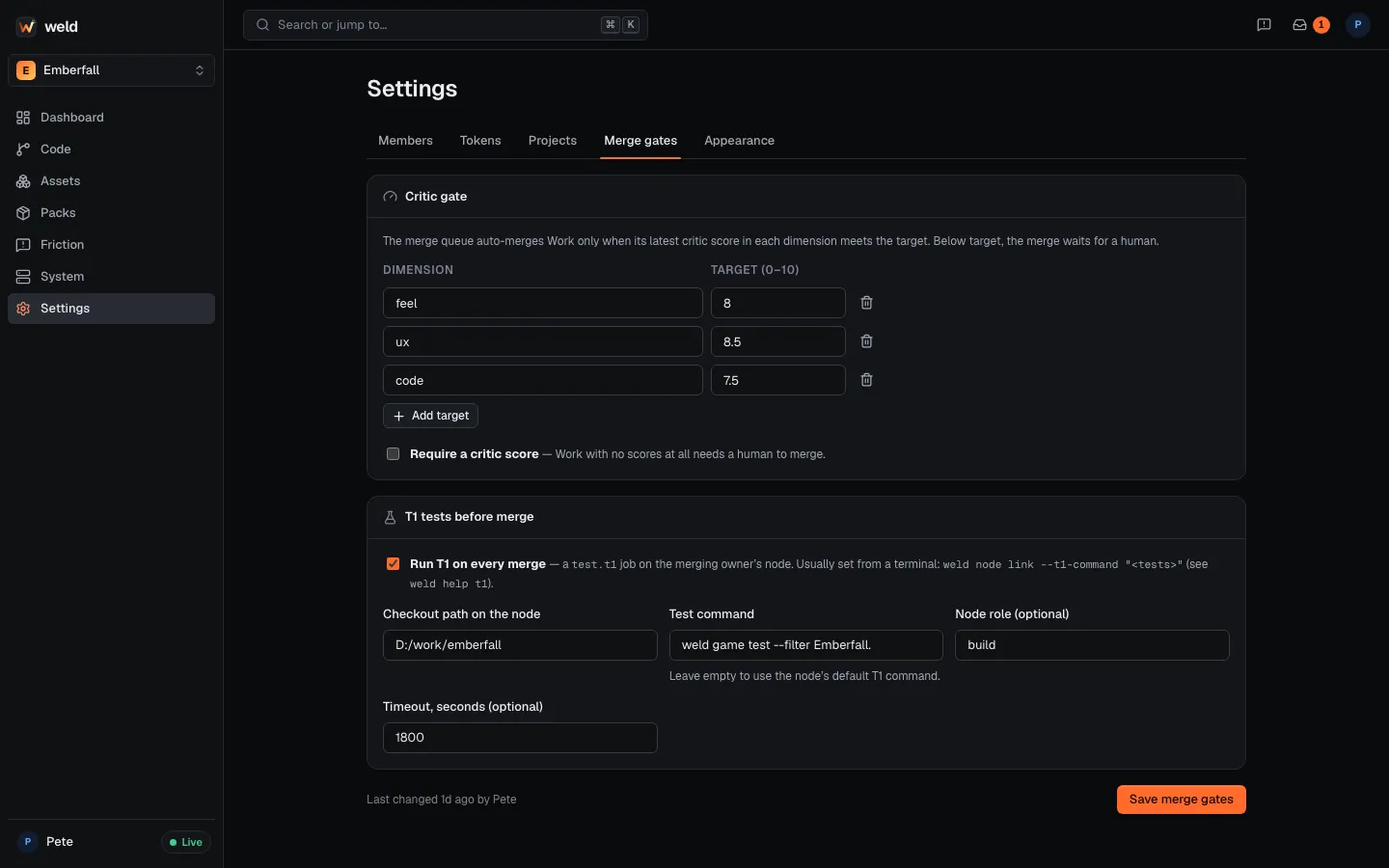
details. The merge gates are also editable in the dashboard’s Settings → Merge gates.
Critic gate
Section titled “Critic gate”If the project sets critic targets (weld agents targets ux=8.5 code=7.5), the queue only
auto-merges when the latest score in every target dimension, recorded for the commit being
merged, meets its target. Below target, the merge waits for a human: review it and
weld merge override <merge id> (humans only) or improve the work. See
Critic loop.
The merge agent
Section titled “The merge agent”Text conflicts go to the merge agent, which runs the merge-resolver agent on the node of
whoever is merging, under that person’s own Claude account:
- It lists the conflicted files and separates binary from text.
- It resolves the text conflicts using both Work items (summaries, approach, scopes) as context, checks no conflict markers remain, and stages the result.
- It runs the T1 gate.
- It reports resolved only when every file is text, its confidence is above the threshold and T1 passes. The queue then commits and merges.
- Otherwise it asks a human with the proposed resolution and the reason:
weld merge approve <merge id>lands it after you review it.
The merge agent never commits by itself, and binary conflicts always go to a human with a side-by-side report built from both sides’ op logs.
After the merge
Section titled “After the merge”The Work item becomes merged (final). If the project has commit summaries on, the
commit-summarizer agent writes a short “AI summary” for each merged commit, shown on the
commit page. A project can turn this off with [summaries] enabled = false in
.weld/project.toml.