
Work items and their lifecycle
A Work item describes one feature someone is building: what, why, which parts of the game it touches, and how. It is the single object Weld coordinates around. An intent (“I’m building inventory drag and drop”), a task queued from the dashboard, a handoff to a teammate and an agent session are all Work items in different states.
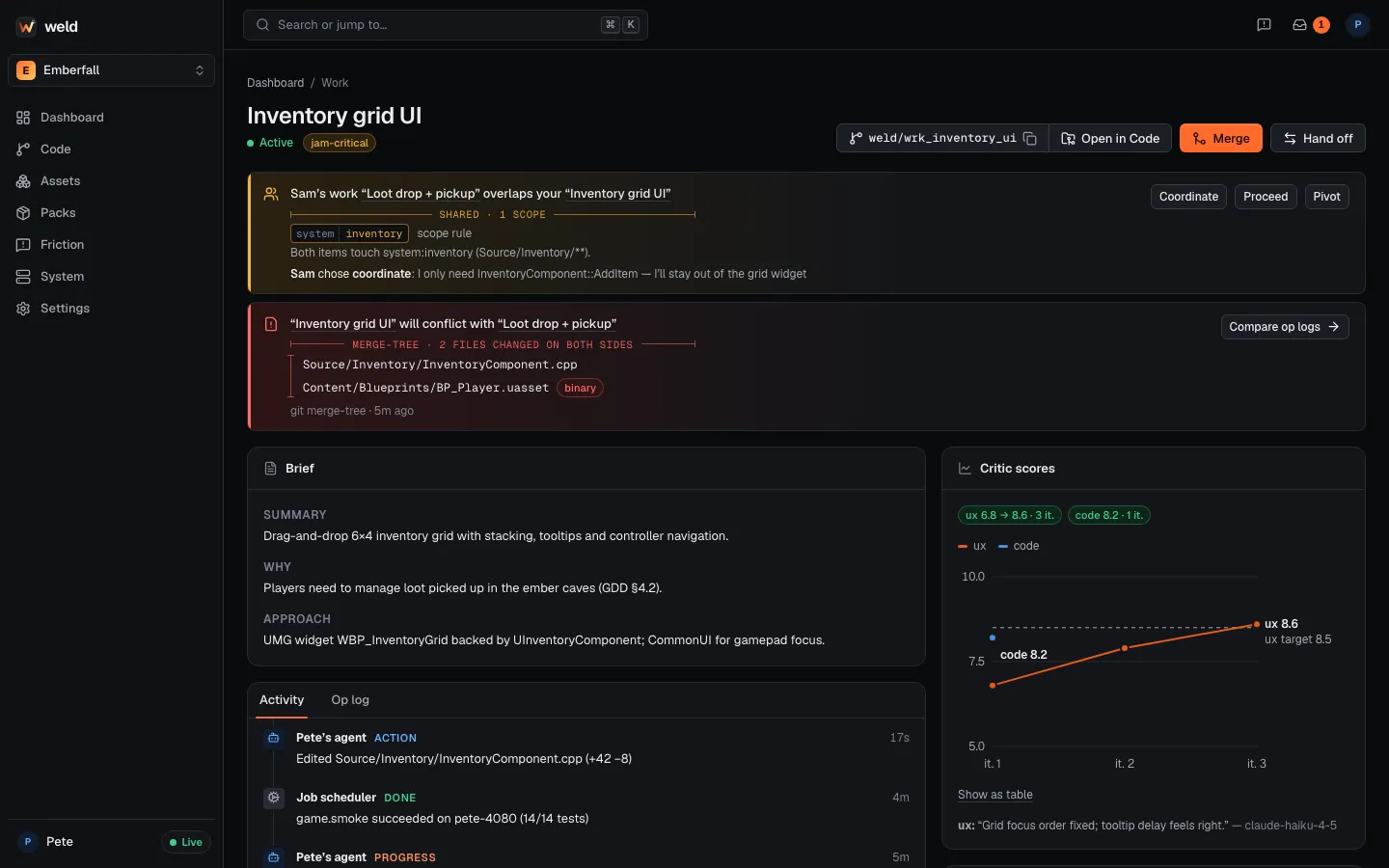
What a Work item holds
Section titled “What a Work item holds”| Field | Example |
|---|---|
| Title | Inventory grid UI |
| Summary | Drag-and-drop 6×4 inventory grid with stacking, tooltips and controller navigation. |
| Why | Players need to manage loot picked up in the ember caves (GDD §4.2). |
| Approach | UMG widget WBP_InventoryGrid backed by UInventoryComponent; CommonUI for gamepad focus. |
| Scopes | ui-screen:Inventory, system:inventory, cpp-module:EmberUI (see Scopes) |
| GDD links | docs/gdd.md#inventory |
| Owner, session, branch | who is working on it, the live agent session, weld/<work id>-<title> |
| Activity and op log | edits, jobs, Unreal MCP operations |
| Critic scores | ux 6.8 → 8.6, 3 iterations (see Critic loop) |
Work items are compatible with the beads issue format and have ids like wrk_…; anywhere a
command takes a Work id, a unique prefix is enough.
The lifecycle
Section titled “The lifecycle”- proposedqueued, handed off or expired
- activea session is working on it
- staleno heartbeat for 15 min (shown as idle)
- readyfinished, waiting for the merge queue
- mergedset only by the merge queue; final
proposed, auto-created (implicit) Work becomes abandoned.
| State | Meaning | Who sets it |
|---|---|---|
| proposed | Queued but nobody is working on it: a handoff, an item created from the dashboard (“+ New work”), or declared Work whose session went away for a day. | weld handoff, the dashboard, expiry |
| active | A session is working on it, with a heartbeat. | Declaring (weld work declare), taking (weld work take), editing, reopening |
| stale | Still open, but no heartbeat for 15 minutes (the machine slept or the session ended). Shown as idle in the CLI. Activity makes it active again. | The hub, automatically |
| ready | Implementation finished and committed, waiting for the merge queue. | weld work ready, weld merge (which also queues it) |
| merged | The merge queue merged its branch into main. Final. |
Only the merge queue |
| done | Closed by a human without merging (“closed, not merged”). Reopenable. | weld work close |
| abandoned | Dropped without merging. Reopenable. | weld work close --abandon, or expiry of an auto-created item |
Rules worth knowing:
- Only the merge queue sets
merged, and only a human setsdone. Agents are told never to set either, because both would make unmerged work look shipped. - Merged is final. Further changes need a new Work item.
- Ready, done and abandoned can be reopened (
weld work reopen <id>); the item becomes active again. - Expiry: after 24 hours without a heartbeat, declared Work goes back to
proposed(so anyone can pick it up) and auto-created Work becomesabandoned.
Where Work comes from
Section titled “Where Work comes from”-
Claude declares it. The
weld-coordinationskill callsweld_work_declarebefore the first edit of a task. You can do the same from a terminal:Terminal window weld work declare "Inventory drag and drop" \--summary "Drag items between grid slots, with stacking" \--why "Loot management, GDD 4.2" \--path Source/Emberfall/Inventory/ --gdd docs/gdd.md#inventoryRe-declaring the same title adds scopes to the existing item.
-
Auto-created at the first edit. A session that edits without declaring gets a lightweight item, titled from the prompt that led to it. Prompts that never edit create nothing.
-
Handoffs.
weld handoff "Polish the loot VFX" --to sam --summary "…"creates a proposed item for Sam. It shows on Sam’s dashboard and at Sam’s next session start, and Sam’s own agent takes it withweld work take <id>. AI work never crosses subscriptions: you hand off the task, not your session. -
The dashboard. “+ New work” (or ⌘K) creates a proposed item for you, a teammate or anyone in the project, with a markdown description, scopes and a priority. Session start lists proposed items for you and Claude asks before taking one.
Working with Work from the CLI
Section titled “Working with Work from the CLI”weld work list # live Work: proposed, active, idle, readyweld work list --all # every state, including merged and closedweld work show wrk_3f2a # one item in fullweld work ready # finished: ready to merge (your only live Work in this repo)weld merge # queue it for the merge queueweld work close --reason "superseded by the new loot system"weld work reopen wrk_3f2a